Table of Contents
The in-game menu can be accessed by pressing X on console versions or P on PC.
The menu consists of six sections that display various game settings and information. You can switch between sections using the left and right directional buttons.
Settings
The Setting menu is used to adjust various game options, including the Master Volume, BGM volume, and SFX volume.
You can also enable or disable the heart icons displayed above marriage candidates when interacting with them.
Character portraits displayed when interacting with villagers can also be hidden without removing the character’s name from the dialogue box.
The Guide option controls whether pop-up messages appear when your character is near an object or location that can be interacted with.
When using a controller, the game provides vibration feedback when using tools or fishing. This can be disabled by setting HD Rumble to Off.
On PC, SoS: FoMT provides several additional graphics options, including:
- Display Mode
- Resolution
- Anisotropic
- Anti-Aliasing
- V-Sync
- Shadow Type
- Depth of Field
These settings can also be accessed through the Configuration Launcher, which also provides language options for English, Japanese, German, Spanish, Chinese, and Korean.
The Button Preset menu allows you to choose from the available button layouts.
On Nintendo Switch, you can choose from several preset button configurations, while on PC, both keyboard and controller controls can be customized manually.
Farm Information
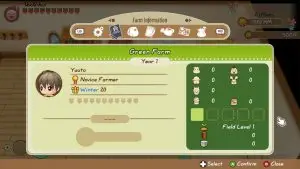
This menu displays a summary of your game progress and information about your farm.
The information shown includes the farm name, current year, character name, Farm Degree, birthday, Power Berry, and the number of Rings obtained.
If you have started a family, the names of your family members will also be displayed in this menu. Meanwhile, relationship progress, such as the number of hearts and music notes, can be viewed through the Relationships menu.
On the right side of the menu, you can see the number of livestock you own, the amount of feed for livestock and poultry, Field Level, and the amount of Lumber and Material Stone you own, both those stored in the cabinet in your house and those in your backpack.
The number of pets you own is also displayed in this section.
Items

This menu displays all items currently stored in your backpack. You can navigate through each item to view its description at the bottom of the screen.
Most items in your backpack can be used, eaten, or discarded directly.
When you consume an edible item, your STA and FAT are restored according to the item’s effects. You can also choose how many items to consume at once.
Journal

The Journal menu is used to save and load game data. This menu opens by default after pressing X on console versions or left-clicking on PC.
The Journal provides up to eight save slots that can be used to create or load saved game files.
On Nintendo Switch, there is no option to manually delete individual save files. On PC, save files are stored in the following folder:
%userprofile%\AppData\Roaming\SOSFoMT
Each save slot uses a different file name.
DPlaydata_0 file is used for Auto Save data, while DPlaydata_1 is used for the first save slot, and so on according to the slot number.
Note that deleting a DPlaydata file does not always permanently remove the data. If Steam Cloud is enabled, the file may be automatically downloaded again when the game is launched.
Tools
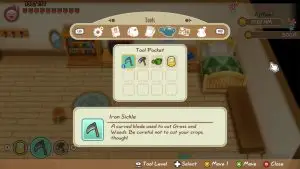
The Tools menu displays information about all tools you own. Each tool includes a description, experience level (EXP), and upgrade status. Tools cannot be discarded through this menu.
The Experience Level section displays the tool’s current upgrade level, the percentage of EXP gained toward the next level, and whether the tool meets the requirements for an upgrade at the Forge.
Tools can be upgraded after reaching the following minimum EXP percentages:
- 10% — Copper
- 28% — Silver
- 55% — Gold
- 100% — Mithril
Tool upgrades do not have to be performed in order. If a tool has reached the EXP percentage required for a higher level, you can upgrade it directly to that level without upgrading it to the previous level first.
For example, if a Copper Tool has reached 65% Experience, it can be upgraded directly to a Gold Tool without first upgrading it to Silver.
Relationships
The Relationships menu displays your relationship levels with villagers, Nature Sprites, livestock, and pets.
In this section, characters can be sorted by Friendship Points, Love Points, or the default order.
The icon next to a character’s portrait will light up if you have already interacted with or given a gift to that character on the same day.
The Nature Sprites section displays the friendship level of each Sprite. You can also view their Helper Skill, which indicates each Sprite’s ability to assist with farm work, as well as the number of days remaining on their assigned task.
The higher a Sprite’s Helper Skill, the more effectively they can complete their assigned work.
In this section, livestock are listed at the top, while poultry is listed at the bottom.
Each animal displays its current heart level and an indicator showing whether you have interacted with or fed it that day.
This section displays your horse and all pets, along with their friendship levels.
The menu also shows whether you have interacted with or given a Pet Treat to the animal that day.
The horse has an additional icon indicating whether it has been brushed.
Below each pet’s heart level is a Skill Bar that indicates the animal’s ability.
For horses, the Skill Bar shows their running endurance, which affects how long they can maintain full speed during races.
Meanwhile, the Skill Bar for other pets shows their ability when participating in the Flying Disc minigame at Mineral Beach.